Angle Measure
January 3rd, 2010 · 3 Comments

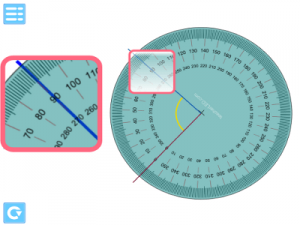
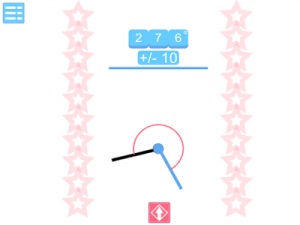
An interactive whiteboard resource to demonstrate the measuring of angles to a class. The two black lines can be moved to create varying angles. The arcs signifying the angles in question can be toggled on or off leaving one or both on display by using the two buttons with the red and blue arcs in them. There are two type of angle measurer that can be used: a 180 degree protractor and a 360 degree angle measurer. These can be toggled by the appropriate buttons on the display or removed by using the very top button. The angle measurers can be rotated by clicking and dragging. They will always be centred over the point where the lines meet.
Using this resource you should be able to realistically demonstrate the measuring of angles.
Go to interactive whiteboard resource.
Please report any problems or suggestions in the comments section.
→ 3 CommentsTags: Shape Space and Measure
Quiz Buzzer
January 2nd, 2010 · 3 Comments
A simple IWB resource to help with class quiz activites. It works as a game show style buzzer and nothing more. There are two button on screen representing two teams. Two students can be at the IWB and hit the button when they know the answer to a question being read out by the teacher. The resource will show who hit the button first by lighting up and playing a buzzer sound. Once illuminated the display dims one light at a time which can be used as an indicator for when the answer has to be spoken by.
Teachers can use this as a tool to suit however they wish their activity to run. A few ideas to involve the whole class as well as just those at the IWB might be useful. The students could revolve after each question. An alternative would be to have all of the students in the class write their answers down. If the student at the front is first on the buzzer and gets the answer correct a further point could be awarded if more than half of his/her team had the correct answer written down. For questions involving long calculations the student at the front can buzz when he believes someone in his team has worked out the answer.
If you find this useful leave a comment witha description of how you used it. Describing any problems with it would also be appreciated in the comments.
→ 3 CommentsTags: General Tool
Function Machine
November 2nd, 2009 · 1 Comment
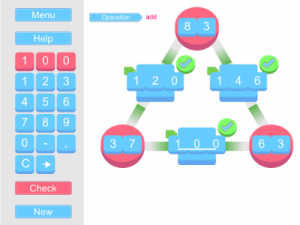
A function machine interactive whiteboard resource. Children seem to enjoy the concept of the numbers going through a process to be converted on a function machine. Borrowing a graphical style from computer games this function machine IWB resource lets you set one or two function machines. Click on the number and it will go through the function machine conversion process. If the number is on the left it will move right going through the process to become the output. If it is on the right the process will be reversed to go back to the input number.
The single blue button brings up a control panel. From here you can determine the input numbers’ start value. The number of functions lets you toggle between one or two function machines. The hide details lets you disguise the the functions, input numbers and operations. Of course, this means that while you can hide all of this from your class you’ll have to count your clicks to know what you are entering. The numbers are also reset by opening and closing the panel.
To enable the whole class to work along with the IWB resource there are a couple of printable resources in a similar style. On these the students can enter the start numbers and then the finish numbers after the process is complete and try to predict what the functions are.
On a technical note the particle effects in this resource may be a strain for older computers especially on larger numbers which don’t really suit the resource but are possible as outputs. While the resource is new please check that any combination of numbers you wish to use in lesson work okay as there is quite a lot going on behind the scenes of this resource and it is impossible for all of the combinations of numbers and actions to be checked for bugs. If you notice any problems or graphical glitches please comment with problem, the numbers that the problem was caused by, an if you know it, your screen resolution. Other comments are welcome too.
Go to interactive whiteboard resource.
Single function machine printable resource.
Double function machine printable resource.
→ 1 CommentTags: Algebra · Number
Combination Breaker
October 5th, 2009 · 8 Comments
This interactive whiteboard resource is designed to facilitate a class competition. The children in the class are divided into 4 groups and allocated a team colour: red,green, blue or yellow. Students follow a printed instruction set to generate a number. Once the team have discovered the combination the team captain goes to the interactive whiteboard, selects his team colour and then enters the combination. Once the number is entered he/she presses the key button. If the combination is correct the appropriate button slides away to reveal a jewel. If the combination is incorrect that team ’s light goes out and they are locked out for a number of seconds. The winning team is the first to get and enter the correct combination. Mis-keys can be corrected by pressing the ‘E’ key.
In the first instance there is one sheet available to download that can be used for students to follow and find a combination. This is designed with a session in the computer suite in mind. The teams will need to use the internet to research facts to help them discover the combination. Teams that make efficient use of planning, communication and teamwork will have an advantage. A good tactic that the students can be left to discover themselves, or informed of, is for some of the team to go ahead in the questions to find necessary information for when it is needed by the students who are performing the calculations. In this way students can develop research and social skills as well as applying their existing mathematics skills.
Teachers can set the number of seconds incorrect answers lock out a team by clicking the solitary triangular button (with the double arrow on it) and then adjusting the slider on the pop-out panel to the desired amount of time. On this panel the appropriate question code should also be selected (there is only ‘number 1′ question sheet available at the moment).
New question sheets will be released over time. It is hoped that teachers who feel they can make use of this resource will create new ones and submit them for others to use. Themed question banks could be created this way where the research is focussed on a particular subject. Or sheets that use only maths skills could be created so that the internet isn’t needed.
Go to interactive whiteboard resource.
Get Combination Sheet Number 1.
Get the answers for Combination sheet number 1, this is a word document with the working out for the sheet above that can be modified for creating new question sheets. Once you have created the new sheet submit it to the email address below and it will be formatted and its final code added to the resource. Please state what credit you would like to receive i.e. name or school etc.

→ 8 CommentsTags: Activity · General Maths · Problem Solving
Rotation Around A Point
September 8th, 2009 · 2 Comments

An interactive whiteboard to demonstrate rotation around a point to your class on an IWB. The small black cross is fixed as the point of rotation in the centre of the screen. Click the red shape to move it around the screen. On release it will snap to alignment. Clicking and dragging the vertically aligned slider to the right will take the shape through its rotation around the centre point. Releasing the slider will snap it to the nearest 90 degree rotation.
You can choose between rotating a square shape or an L shape using the button below the slider. The button with a circle toggles the path of rotation on and off. The four pale blue discs canbe dragged and dropped to mark key points. For example you could mark the original top left corner of the shape and where it is expected to be after a 90 degree rotation.
A printable resource is also included for students to cut out and predict what they will think will happen during different rotations.
Go to interactive whiteboard resource.
Go to printable resource.
A resource that is similar but for translating shapes is Translation Plotter.
→ 2 CommentsTags: Shape Space and Measure
New Merology
August 29th, 2009 · No Comments

An excellent book for finding interesting maths challenges for students is Professor Stewart’s Cabinet of Mathematical Curiosities. They can be used for setting tasks that combine areas of maths knowledge and they also highlight to students that maths questions aren’t solved in seconds but require devising strategies to solve them. They are superb for developing deeper thinking skills.
One task in the book is called New Merology originally developed by Lee Sallows. The interactive whiteboard resource here supports demonstrating this puzzle to students. The challenge is to find a unique value for each of the letters in the spellings of the words zero to twelve so that when added up they equal the value of the word in which they are in. So the number chosen for the letter “O” added to the number chosen for the letter “N” added to the letter chosen for the letter “E” must add up to 1. Of course the letters appear in other words so by picking a value for “N” you also have an impact on the sum of the letters in “T+E+N”.
The resource allows you to chose a letter then select its value by dragging the red marker across the top. If any of the values you have chosen are duplicated a warning will show. The resource will also sum the values for each word. While this resource could be used to aid in the solving of the problem a more effective use is to just use it to demonstrate the problem to the class and to use it to discuss different approaches to the problem as it avoids lengthy recalculations when a value is changed. The student’s maths skills will be improved more if they work at the puzzle manually. This puzzle will then give them a practical application for their skills in adding negative numbers as well as the deeper thinking skills involved. A printable resource is also available below to give a structure to the puzzle. It may be useful to laminate the print out so that students can use non-permanent markers to to write with and rub out as they change values.
The solution will not be included here as it is available in the book Professor Stewart’s Cabinet of Mathematical Curiosities
and the intention here isn’t to take anything away from the book but rather support its use in the classroom. The range of values used in the solution is from -7 to 11 as shown in the resource.
Go to interactive whiteboard resource.
Get printable resource.
Report any problems in the comments. Also, do you find resources such as this interesting or are the more usual teaching resources more useful?
→ No CommentsTags: Algebra · Investigations · Problem Solving
Aesop’s Fables
August 27th, 2009 · 4 Comments
A different Interactive Whiteboard resource to usual. This one is similar to the alphabet books published on this site last year. The text and pictures come from a book now in the public domain due to its age. They’ve been put into an interactive book for class reading. The morals for each fable are hidden by a label – clicking it will remove the label.
To accompany this IWB resource is a printable version of the stories. There is also a sheet that contains the morals. This can be used as a class exercise where the students read the fables and match the most appropriate moral to it.
Click and drag the pages to turn them. Please report any errors or typos in the comments section.
Go to interactive whiteboard resource.
Get printable resource.
→ 4 CommentsTags: Stories