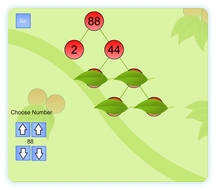
 An interactive whiteboard resource to use for demonstration or questioning purposes with a class. Select a number from 2 to 99. Clicking “Go” will generate a prime factor tree for that number. The numbers will be obscured by leaves which can be removed by clicking on the leaf. This allows discussion on what the numbers will be before they are revealed.
Once all of the leaves are removed the prime factors can be pointed out.
Go to this interactive whiteboard resource.
Use this factor resource to sort factors on a venn diagram.
My only question or comment is that I guess this makes it look like there is only one way to get the prime factors. For example, the screen shot above is for 88. What if the student started with 8 x 11 and then worked from there? I would like this better if you got to pick what set of factors you started with. I can’t assume that every student will start with 2 x 44. I really like the “tree” and “leaves” analogy though! 🙂
Hi,
Thanks again for the input – I think people’s suggestions and ideas are the best way to refine the resources I produce and it is why the website is structured to allow comments.
Yes I fully agree with you about the limitation of this resource. One of the things that I’m really learning as I make these resources is that its often impossible to cover all options and keep the resource simple enough to use with an IWB in front of the class. Here is the design justifications for the result:-
I held this resource back for while as I tried to balance it. What I wanted was the potential to choose a number and just have a factor tree instantly on the IWB to allow speedy/simple teaching. I don’t really like the resource to require much thought to use as then it places more load on the teacher than it provides benefit.
Depending on how I program the computer to find the prime factors some numbers will always generate a tree different to one a person might naturally create. So the solution to this is to allow the user to pick the factors but this removes the speediness of the resource and adds more buttons to the screen (as the resources are for the IWB I try to never require acces to the keyboard). My feeling was that perhaps the most logical way to create a factor tree manually with the most appropriate factors was actually to just draw it the old fashioned way with pen and board. Adding an electronic resource in this case is really using a tool that isn’t required. The only way I can see an elctronic resource working that lets the teacher choose the factors is quite cumbersome. It would involve punching in number after number on an on-screen interface. Writing is much more natural for this.
However where the teacher just wants to get the prime factors on screen, with some obscured, as the class work through one way to get the primes then an electronic resource has an advantage over pen and board as its quick and has a ready made tree to follow. It loses flexibility but gains convenience. I think this gives it quite a narrow focus and makes it more of a supporting resource, but one that has uses as opposed to one that is broader but is adequately served by traditional methods.
This reply isn’t to defend the resource, I’ll happily rework it and if it resulted in the last word in teaching factor trees it would be worth it!
I hope that outlining the thinking might result in a good idea for adjusting it or might suggest an entirely different resource better suited to the subject – one that is the last word in prime factor tree teaching!
Further suggestions welcome from everyone.
Spencer
This is great and really clear – much better than the other online resource I have been using to support teaching this – thanks
It is cool and my class loves it I’d just wish I could play it somehow. Can you tell me how please.
Not sure what you are having difficulty with. Could you explain more please?
Spencer
i think u should make game where the person thinks of a number for the prime factor tree they put t in the box and let them try and get the right answer and if they dont give the right answer and explain it for tem
I’d like this resource better if you could use the other factors, particular when I try to teach my students to look for other factors besides just 2 first that might get them to the answer quicker, however I’m lucky enough to have an interactive whiteboard side by side a normal whiteboard, so we looked at the other combinations we could do on that and it really made it clear then for the kids to see there a
are a number of different ways at arriving at the same answer. Thanks for the resource.
that is not a factor tree
that is so awesome thanks so much for the help
Agree with the point that Halli Cooper was trying to make. Surprisingly almost 3 years have passed to this suggestion made. I think we could have evolved a better technique to work upon this idea.
Would like to hear more, know more. I believe any site that has to sustain and gather positive response should keep updating itself and its resources.
BUt in 3 years nobody has refuted the reasoning for the way it works that I outlined in my response to Holli and so a better technique has not evolved. I still believe that working through a prime factor tree with pen and board is still the best way to teach this as any user interface will just add additional barriers. Minimising the load on the user results in the computer offering a prime factor tree that you may not find ideal but doesn’t require you to start plugging numbers in on an IWB. This resource, I think, offers one way but not the best way. THe best way is the old pen and board way. Technology does not always add an improvement.
Do you have a suggestion how to improve?
I would also add that this site sustains itself around my full time teaching job and the resources are built in the time when I am not working. It is updated as much as I can around this.