Resources Tagged as 'Investigations'

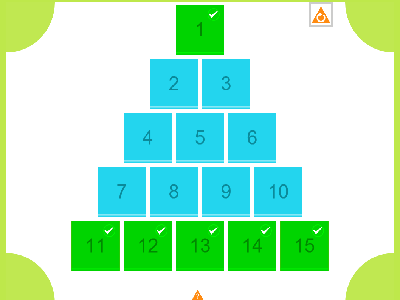
This resources brings a popular old resource up to date. As well as being smartened up this resource is compatible with iPads and other tablets as well as PCs. In essence it is the same as the older resource and is made to accompany a puzzle published in an old book by Henry Ernest Dudeney. The puzzle is a useful one for teaching deeper mathematical thinking because while it can be solved by trial and error, thinking about the maths behind it can make it much easier.
The goal is to choose a number that all 4 sides of the frame can add up to and arrange the cards to do this. Some numbers are possible some numbers are not. This puzzle has been selected as it allows students of all abilities to have a go as the maths involved is not difficult. The challenge should be to find a method of determining what numbers can be used as the common total amount, and then how to make finding the layout much easier. The resource provided here allows the puzzle to be demonstrated easily and can also allow whole class discussion of how to approach the problem. Clicking on one card and then another causes them to swap places. The resource totals the different lines automatically. Tapping the chalkboard brings up brief instructions.
If you would like the solution and teaching notes to this puzzle please contact me on twitter as this makes it much easier to see if it is a teacher or a child cheating on homework! If you don’t use twitter leave a request in the comments but this will take longer to receive a response.
This resource does not work with Internet Explorer 9. On Windows please upgrade to IE 10 or use Chrome or Firefox. Or use the original version of this resource linked to above.
Go to teaching resource.
HTML5 performance is still not quite there yet so on some devices this resource may lag slightly.
[Read more →]
Tags: General Maths · Investigations · iPad Compatible

This interactive whiteboard resource forms the first part of a themed series of resources that support the use of a Soma Cube in teaching. If you know about the Soma Cube then this resource is useful for showing a class the basic pieces and some of the shapes that can be made from them. Choose either shapes that can be made from a set of Soma pieces or the individual peices themselves and scroll through them using the arrows at the bottom of the screen.
Depending on your screen resolution you may need to set your browser to full screen. On IE press F11.
If you would like to know more about using the Soma Cube for problem solving lessons or developing spatial reasoning please see the supporting article on the new site designed to support the resources here. teacherledplus.com A number of activities and suggestions are made here. Alternatively the following book includes the original publication by Martin Gardner that brought the puzzle to the masses:The Colossal Book of Mathematics
View this Soma Overview interactive whiteboard resource.
There are two more resources designed to be used in a Soma themed series of lessons and these are:
Soma Bingo
Soma Isometric Drawing
Please feedback on these themed resources with any problems suggestions or ideas in the comments or follow this site on Twitter.
[Read more →]
Tags: Investigations · Problem Solving · Shape Space and Measure

The third interactive whiteboard resource in a series to aid using Soma Cubes in lessons. This one is to facilitate adding a competitive element to their use. Break the class into groups and allocate them to one of four colours red, green, yellow or blue. Set a goal. This may be to complete a horizontal line, vertical line or any line. When a group shows you that they have completed a shape they can capture that square by pressing the appropriate colour on the appropriate box. That square is then captured for 2 minutes or permanently if you activate that option. To take take a closer look at a shape click the small picture inside the box. Click the larger picture to close it. There is far more detail on how to use this resource on the teacherledplus.com link below.
Go to Soma Bingo Interactive whiteboard Resource.
To learn more about using Soma Cubes in lessons for practising spatial awareness and problem solving skills see this the supporting site to teacherLED.com – teacherledplus.com
View Soma Cube Introduction IWB resource.
Soma Isometric Drawing
Depending on your screen resolution you may need to set your browser to full screen. On IE press F11.
Please feedback on these themed resources with any problems suggestions or ideas in the comments or follow this site on Twitter.
[Read more →]
Tags: Investigations · Problem Solving · Shape Space and Measure

This interactive whiteboard resource can be used as part of the Soma Cube themed resources on this site or as a standalone resource for demonstrating how to draw using isometric dotted paper. By clicking the appropriate button either a piece from the Soma Cube or one of the shapes it can make are shown along with a an isometric dotted grid. Students and teachers can demonstrate how to draw the shape isometrically using these. To draw click and hold on a dot and move to another. Once you touch another dot the line will be straightened and you can progress to the next dot. If you make a mistake click undo to step back through the lines.
Go to Soma Cube isometric drawing resource.
Find out more about using the Soma Cube in lessons on the supporting site’s article “Soma Cube“.
View Soma Cube Introduction IWB resource.
View Soma Bingo IWB resource.
Depending on your screen resolution you may need to set your browser to full screen. On IE press F11.
Please feedback on these themed resources with any problems suggestions or ideas in the comments or follow this site on Twitter.
[Read more →]
Tags: Investigations · Problem Solving · Shape Space and Measure

An interactive whiteboard resource that gives you a complete lesson activity for teaching about approaching problems systematically. The problem presented here is an updated version of one first presented by H.E. Dudeney in the early 20th Century.
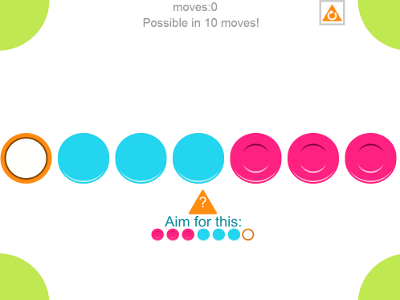
The IWB resource presents a reaction test. The test is successfully passed if 4 circles are lit up and they form the shape of a square. The resource will join up the circles if the square is formed. The resource is really only intended to engage the students in the problem. It is used best if the students come up and try and achieve a succesful square by pressing the red button. When the first student achieves one tell the class that the next square must not be of the same type as the one previously done. Or if a student misses an intended circle ask if it is possible to still form a square.
Here are 2 examples of two possible scoring formations:

You can see that both layouts form a square.
Once the students understand the ways to find a scoring layout set them the challenge of finding how many different ways there are to achieve a scoring layout using 4 circle targets. This works best if in the first instance you let the students come up with their own methods. In the pdf for this resource there is a blank target to be printed for the students to use. Most students will try colour coding and find that it is hard to work clearly. The next step is to introduce them to working systematically using a table. The pdf includes a tabular layout to allow the students to easily work through all of the different combinations and come up with the final number. You can print this or the children can create their own.
Once the students believe they have worked systematically and are confident they have got the final total you can press solve on the resource to cycle through all of the solutions with a count to help you keep track.
I’ve found this lesson very effective in allowing the students to see how much easier a task is if laid out in an appropriate manner and worked through systematically. Download the pdf for further notes. Please feedback on any problems or ways that you have used the resource in the comments section below.
Go to interactive whiteboard resource
Get supporting print out.
[Read more →]
Tags: Activity · Investigations · Problem Solving

An excellent book for finding interesting maths challenges for students is Professor Stewart’s Cabinet of Mathematical Curiosities
. They can be used for setting tasks that combine areas of maths knowledge and they also highlight to students that maths questions aren’t solved in seconds but require devising strategies to solve them. They are superb for developing deeper thinking skills.
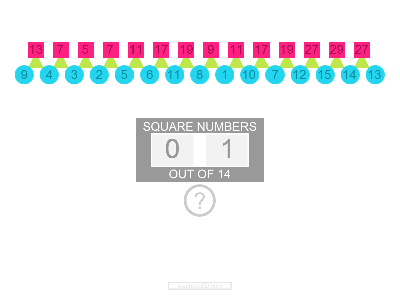
One task in the book is called New Merology originally developed by Lee Sallows. The interactive whiteboard resource here supports demonstrating this puzzle to students. The challenge is to find a unique value for each of the letters in the spellings of the words zero to twelve so that when added up they equal the value of the word in which they are in. So the number chosen for the letter “O” added to the number chosen for the letter “N” added to the letter chosen for the letter “E” must add up to 1. Of course the letters appear in other words so by picking a value for “N” you also have an impact on the sum of the letters in “T+E+N”.
The resource allows you to chose a letter then select its value by dragging the red marker across the top. If any of the values you have chosen are duplicated a warning will show. The resource will also sum the values for each word. While this resource could be used to aid in the solving of the problem a more effective use is to just use it to demonstrate the problem to the class and to use it to discuss different approaches to the problem as it avoids lengthy recalculations when a value is changed. The student’s maths skills will be improved more if they work at the puzzle manually. This puzzle will then give them a practical application for their skills in adding negative numbers as well as the deeper thinking skills involved. A printable resource is also available below to give a structure to the puzzle. It may be useful to laminate the print out so that students can use non-permanent markers to to write with and rub out as they change values.
The solution will not be included here as it is available in the book Professor Stewart’s Cabinet of Mathematical Curiosities
and the intention here isn’t to take anything away from the book but rather support its use in the classroom. The range of values used in the solution is from -7 to 11 as shown in the resource.
Go to interactive whiteboard resource.
Get printable resource.
To help you flesh out a lesson using this resouce and the benefits it has on learning there is a supprting article on teacherledplus.com.
Report any problems in the comments. Also, do you find resources such as this interesting or are the more usual teaching resources more useful?
[Read more →]
Tags: Algebra · Investigations · Problem Solving
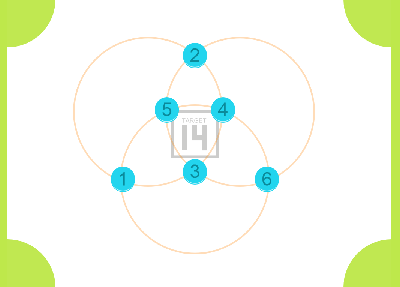
An interactive whiteboard resource to accompany a puzzle published in an old book by Henry Ernest Dudeney. The puzzle is a useful one for teaching deeper mathematical thinking because while it can be solved by trial and error thinking about the maths behind it can make it much easier.
The goal is to choose a number that all 4 sides of the frame can add up to and arrange the cards to do this. Some numbers are possible some numbers are not. This puzzle has been selected as it allows students of all abilities to have a go as the maths involved is not difficult. The challenge should be to find a method of determining what numbers can be used as the common total amount and then how to make finding the layout much easier. The resource provided here allows the puzzle to be demonstrated easily and can also allow whole class discussion of how to approach the problem. Clicking on one card and then another causes them to swap places. The resource totals the different lines automatically. The original wording of the puzzle can be made to appear by clicking on the question mark button.
A printable sheet accompanies this resource which includes the original wording and diagram. It also includes the appropriate cards for cutting out to do the puzzle away from a computer. If teachers would like the solution and maths behind it leave a comment with your email address in the box (it will not be published). There will be at least a 5 day delay to ensure that students who have been set this as homework aren’t cheating by impersonating a teacher!
Go to interactive whiteboard resource.
Get printable resource.
[Read more →]
Tags: Investigations · Problem Solving