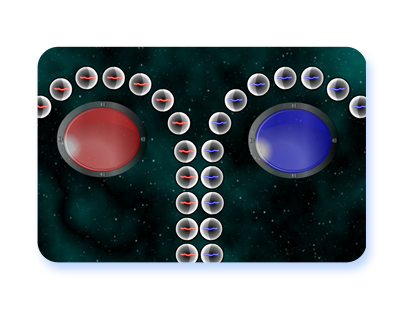
 A simple IWB resource to help with class quiz activites. It works as a game show style buzzer and nothing more. There are two button on screen representing two teams. Two students can be at the IWB and hit the button when they know the answer to a question being read out by the teacher. The resource will show who hit the button first by lighting up and playing a buzzer sound. Once illuminated the display dims one light at a time which can be used as an indicator for when the answer has to be spoken by.
Teachers can use this as a tool to suit however they wish their activity to run. A few ideas to involve the whole class as well as just those at the IWB might be useful. The students could revolve after each question. An alternative would be to have all of the students in the class write their answers down. If the student at the front is first on the buzzer and gets the answer correct a further point could be awarded if more than half of his/her team had the correct answer written down. For questions involving long calculations the student at the front can buzz when he believes someone in his team has worked out the answer.
If you find this useful leave a comment witha description of how you used it. Describing any problems with it would also be appreciated in the comments.
Go to Interactive Whiteboard Resource.
There is a supporting article on using this resource in conjunction with others on teacherledplus.com.
It’s really wonderful and amazing, too…My students will love it!!! 😉
Cool idea. Would it be possible to tie the respective colors to a key press like red to A and blue to say L? Just a thought…
Thanks for the suggestion. It is possible but I aim to ensure the resources work without using the keyboard as I find resources that use an IWB and keyboard to be awkward in many classroom layouts. Despite this I can see the point in breaking that rule with this resource as it is very simple and and limited in its intended scope so there is unlikely to be any problem in its use this way. I’ll add it to the ever increasing to do list!
I have used this with my class and they loved it. Would there be any chance of setting up more buzzers on a screen at once, say 4 instead of 2. This would allow us to have more smaller teams taking part.
This buzzer is awesome but how do I download it to use?
Glad you like it but… sorry – this is a totally free to use site and to support this the resources must be accessed on line only.
Thanks – have used this very successfully with a goup of young adults with a quiz / check of learning of past simple verb forms.
Love the buzzer! I like Darren’s idea of possibly adding more buzzers for smaller groups. This would allow for more student to get involved rather than waiting forever for a turn. Perhaps an option on buzzer sounds as well? Students LOVE choices and something fun like different sounds would really make this fun. One final suggestion I have is to put the buzzer button lower so that younger or shorter students can have an easier time reaching it. These are merely suggestions! I love the free resources. Keep up the great work!
Thanks for the suggestions. This resource has been more popular than I expected so I will look at making those adjustments in a new version.
Looking forward to theadjustments. Go, go, go.
Love this!!!
great
but no point of using it
Well, the point of using it comes when you add a little imagination.
Simple & effective! Thanks.
I’d really love to use this on my smartboard, but I don’t want to have to switch between the website and my game in smart notebook. I really wish I could download it, even if it had an ad or something.
i like it i wish it came not only in the two team format but three and four etc as well