 An updated version of this resource that is compatible with tablets, phones and other devices is available here: Classroom Dice.
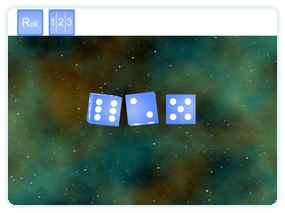
True 3D dice to use on your interactive whiteboard. Select to display one, two or three dice on screen. Click ‘Roll’ for them to roll.
Useful in probability lessons and at any other time when a random choice needs to be made.
Go to learning resource.
There is an article on how you can use this resource to do a magic maths trick that help introduce able children to algebra on teacherledplus.com.
A great interactive resource. Would it be possible to request a similar resource but with 10 sided dice??
Thanks. I will look into creating a 10 sided dice. I suspect the extra complexity might mean not having three on screen but at least one should be possible. Check back sometimes to see if I’ve succeeded!
Hi,
I am an ICT teacher at Collingwood Elementary. I have had a look through the resources and they look great. I will be showing theswe to my teachers. I am intrigued by the resources and how you profduced them. You mentioned programminbg. What software./language did you use. I can see many other resources that can be made and I would like to try my own hand at it.
Thanks for all your great work.
Bill
Thanks. A few people have asked about how the resources are made/how to begin making them so I’ve added a page. See the “Creating Resources” link at the very top of the page.
Hope that helps.
I am very new at this and am finding my way at a slow pace. Question, I have seen demos where an object is selected, dragged to another object and sometimes stayed there, other times it jumped back from where it came from. I have no idea how to do this but would love to get this trick into my classroom. Thanks
A great resource. Any chance of having a screen with two 12-sided dice? This way we can play times tables games up to 12 x 12.
That’s a great idea but I’ll have to think carefully how to make it… it’ll be a lot harder than with cubes!