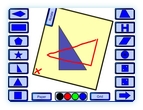
 Demonstrate the use of tracing paper in checking the rotational symmetry of a shape. Using “virtual” tracing paper you can demonstrate this method using an interactive whiteboard. Place a shape. Place the tracing paper then draw on to it using the interactive whiteboard. Use the rotate tab to count the order of rotational symmetry.
Go to learning resource
Get instructions
Hi, yet again,so impressed. I have not found any great resources to really show rot. symmetry well and this does. We played a game where the kids had to colour round the shape and everytime they went wonky, the other team got a mark. They loved it! Then real bonus points for the correct order of rotation. Thanks so much. Got a bit fed up this week as lots of my free resources are now not free and you still are..hope it stays that way because myself and my kids could not do without your brilliant resources. Kind regards patricia
Hello again. I’m glad you liked it as this resource isn’t used very much – I was starting to wonder if there was a fault with it that I couldn’t find. Thanks for sharing how you used it. That might help others.
As for staying free it will remain that way permanently.
Thanks again for the feedback, Spencer
One hour after finding a factor resource for my lesson I am still amazed at all these brilliant resources. I hope to use several of them.
This is an excellent resource. I am always frustrated that onan interactive whiteboard it is so hard to modelhow to use tracing paper etc., this does it really well
many thanks
Hi
This is a fabulous resource but I have one question: Why can’t I download it?
We have flaky internet at school, the by product of living in the sticks, and as such I usually like to download the .swf files and embed them into a smart notebook or flipchart. Sadly, when I do this from this site it only captures the loading -> GO screen and not the actual resource.
I’m sure this is by design, but it did make me a sad panda.
I am sorry to make you anything less than a contented panda but if I make it easy for people to download my resources they visit the site much less and it then doesn’t support itself. Then I’m a sad panda with software and server costs to pay. To be fair even sites you pay to access don’t usually allow download. At least these are free?
This is amazing! I’ve never seen anything like it. I am a student teacher, and just found out during my Transformations unit that tracing on the Smart Board is practically impossible. Love this resource!
I first used your wonderful resource on one of my teaching placements in university. I have now graduated and have my own class and I am still using it. A great way of getting the concept across to children. Thank you.