Vowel Digraphs
April 26th, 2009 · 6 Comments
A literacy focussed Interactive Whiteboard resource. This resource is to be played at the IWB by students. A common vowel combination is shown at the top of the screen and the student is challenged to make the longest word they can from the variety of letters shown on the given tiles. Non-scoring words such as those that do not contain the given vowels or are incorrect will result in points being taken away. A four letter word will score 1, a five letter word 2, 6 letters will score 3 and more than 6 will score 5. Each game is timed with the time available be set by the teacher. There will always be at least a 4 letter word that is possible for each selection.
A high score facility has been suggested for some previous resources so has been incorporated into this resource for the current session.
This resource will take longer to load than others due to the size of the built in dictionary. If any problems are found with the dictionary such as not recognising a common word please report it as well as any other errors you may encounter. As ever the final error testing for this resource is in the hands of the users.
Note this resource is superceded by this IWB resource which has been created in response to the comments below.
→ 6 CommentsTags: Spelling
Translation Plotter
April 8th, 2009 · 12 Comments
Teach the translation of shapes using this interactive whiteboard resource. Click on one of the shape buttons to the right of the grid to display the corresponding shape in a random position. A set of instructions for translating this shape will also appear in the blue box. Drag and drop the four circular markers to the translated position of the shape’s corners. If they are placed in the correct position the translated shape will be drawn on the screen.
The instruction box can be dragged to convenient locations on the screen. The translating instructions can be set to words or vectors or both.
Please report any errors in the comments section.
→ 12 CommentsTags: Shape Space and Measure
Clock Rotation
March 10th, 2009 · No Comments
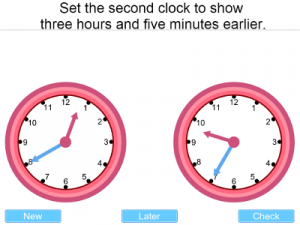
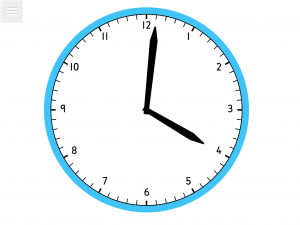
An interactive whiteboard resource to practise visualising clockwise and anticlockwise rotations.
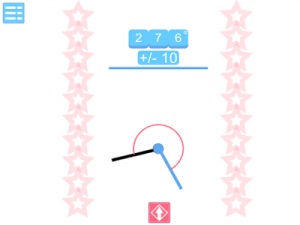
When you click on “go” the clock face will be obscured. When it is shown again the numbers will be hidden. The blue box at the side tells you how many degrees the clockface has been rotated by and whether the rotation was clockwise or anticlockwise.
The rotations are always in multiples of 3o degrees. Clicking “show” will reveal the clock’s numbers and the answer. This would probably be useful as a plenary activityafter a lesson on rotation.
Any comments are welcome as are error reports and suggestions for improvement.
Interactive whiteboard resource.
If you are looking for a traditional interactive whiteboard clock for lessons on telling the time go to: interactive whiteboard clock on this site.
→ No CommentsTags: Shape Space and Measure · Starter/Plenary
Reading Scales 2
February 18th, 2009 · 16 Comments
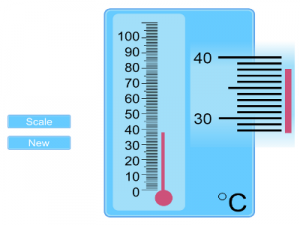
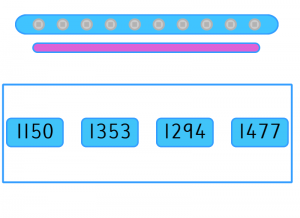
An update to the most frequently used interactive whiteboard resouce on this site. A variety of measuring devices can be shown on the screen grouped together in themes. Use the arrow buttons to select between them. Click the “New” button to generate a new set of readings.
More than one device is shown on screen to allow for the differentiation between abilities during a class questioning session. Some devices have more complex demarcation than others. Some devices will always move to a whole mark on the scale others allow a measurement to fall in between. Those devices where the demarcation may be difficult to read from a distance use a magnifying mechanism alongside them.
Reading scales 2 interactive white board resource.
The original reading scales resource. On the whole this uses more straightforward scales so may be useful for introducing the concept.
If you have any suggestions for new measuring scales for this resource or encounter any problems please leave a comment.
→ 16 CommentsTags: General Maths · Number
Venn Factors
January 31st, 2009 · 4 Comments
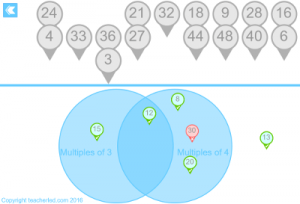
An interactive whiteboard resource to demonstrate sorting groups of factors using a venn diagram. This resource could be useful when teaching highest common factors.
Use the arrows to change the number to generate factors for. Drag and drop the tiles to the correct position on the venn diagram. They will illuminate green when correctly placed and red when incorrectly placed.
Go to interactive whiteboard resource.
A similar interactive whiteboard resource focussing on multiples rather than factors.
Another factor based resource but one that demonstrates prime factor trees.
→ 4 CommentsTags: Number
Venn Multiples
January 27th, 2009 · 9 Comments
An interactive whiteboard resource to assist in teaching common multiples using a Venn diagram. Select which two numbers you wish to generate multiples for. Either you or the students can drag the tiles on to the diagram. The tiles will glow red if they are in the wrong place and green if they are in the correct place
The resource should give you easy flexibility as you can choose which groups of multiples to work with with during the lesson. This means you can tailor the activity to suit the students as you go without having to pre-plan for each eventuality.
Interactive Whiteboard Resource
You may find this supporting resource on finding the Lowest Common Multiple useful:
→ 9 CommentsTags: Number
Rep-Tiles
January 19th, 2009 · No Comments
This interactive whiteboard resource is inspired by one of the entries in the book: Professor Stewart’s Cabinet of Mathematical Curiosities by Ian Stewart.
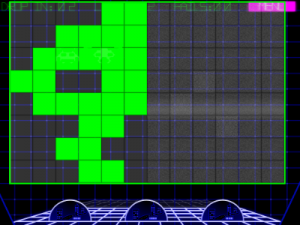
It focusses on repeating tiles where duplicates of a shape combine to form a larger version of the same shape. The picture above shows one such shape about to be completed. This can form part of a lesson on tessellation or investigating shape properties.
Each tile has 3 icons on it. One to drag it, one to rotate it, and one to flip it. The icons down the right hand side let you choose one of 7 different types of repeating tiles.
Also included is a collection of the shapes that can be downloaded, printed, and cut out so that the students can work individually on solving each shape. Some of the solutions require the shapes to be flipped so their reverse could be shaded by the students first.