TeacherLED Resource

Interactive Whiteboard Resources For Teachers

Welcome to TeacherLed.com. This site aims to provide teaching and learning resources to make the use of the interactive whiteboard in the classroom easier and more productive. Interactive whiteboard resources are categorised on the left. New interactive whiteboard resources are below.


Reading Scales 2

February 18th, 2009 · 14 Comments

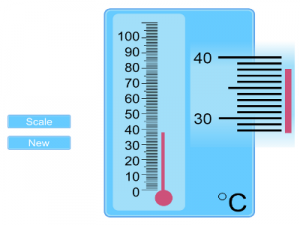
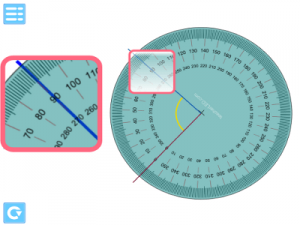
An update to the most frequently used interactive whiteboard resouce on this site.  A variety of measuring devices can be shown on the screen grouped together in themes.  Use the arrow buttons to select between them.  Click the “New” button to generate a new set of readings.

More than one device is shown on screen to allow for the differentiation between abilities during a class questioning session.  Some devices have more complex demarcation than others.  Some devices will always move to a whole mark on the scale others allow a measurement to fall in between.   Those devices where the demarcation may be difficult to read from a distance use a magnifying mechanism alongside them.

Reading scales 2 interactive white board resource.

The original reading scales resource.  On the whole this uses more straightforward scales so may be useful for introducing the concept.

If you have any suggestions for new measuring scales for this resource or encounter any problems please leave a comment.

→ 14 CommentsTags: General Maths · Number

Venn Factors

January 31st, 2009 · 4 Comments

An interactive whiteboard resource to demonstrate sorting groups of factors  using a venn diagram.  This resource could be useful when teaching highest common factors.

Use the arrows to change the number to generate factors for.  Drag and drop the tiles to the correct position on the venn diagram.  They will illuminate green when correctly placed and red when incorrectly placed.

Go to interactive whiteboard resource.

A similar interactive whiteboard resource focussing on multiples rather than factors.

Another  factor based resource but one that demonstrates prime factor trees.

→ 4 CommentsTags: Number

Venn Multiples

January 27th, 2009 · 9 Comments

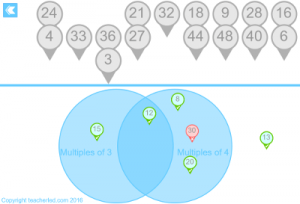
An interactive whiteboard resource to assist in teaching common multiples using a Venn diagram.  Select which two numbers you wish to generate multiples for.  Either you or the students can drag the tiles on to the diagram.  The tiles will glow red if they are in the wrong place and green if they are in the correct place

The resource should give you easy flexibility as you can choose which groups of multiples to work with with during the lesson.  This means you can tailor the activity to suit the students as you go without having to pre-plan for each eventuality.

Interactive Whiteboard Resource

You may find this supporting resource on finding the Lowest Common Multiple useful:

Finding LCM  Interactive Whiteboard Resource.

→ 9 CommentsTags: Number

Rep-Tiles

January 19th, 2009 · No Comments

This interactive whiteboard resource is inspired by one of the entries in the book: Professor Stewart’s Cabinet of Mathematical Curiosities by Ian Stewart.

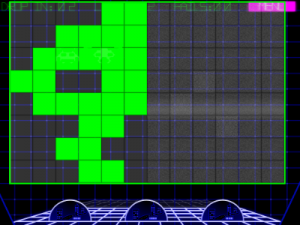
It focusses on repeating tiles where duplicates of a shape combine to form a larger version of the same shape.  The picture above shows one such shape about to be completed.  This can form part of a lesson on tessellation or investigating shape properties.

Each tile has 3 icons on it.  One to drag it, one to rotate it, and one to flip it.  The icons down the right hand side let you choose one of 7 different types of repeating tiles.

Also included is a collection of the shapes that can be downloaded, printed, and cut out so that the students can work individually on solving each shape.  Some of the solutions require the shapes to be flipped so their reverse could be shaded by the students first.

Go to interactive whiteboard resource.

Download worksheets.

→ No CommentsTags: Investigations · Shape Space and Measure

Historical Maps

January 6th, 2009 · 1 Comment

This group of interactive whiteboard resources utilises a number of maps that have passed into the public domain due to their age.

When the map appears there is a green box in the top left.  Drag this to the point on the map that you wish to zoom into.  Once zoomed in you can drag the map around.  You can place map pins by selecting the appropriate colour and then clicking where you would like to position it.  Clicking on a placed map pin removes it.  Clicking the hand icon lets you go back to scrolling the map.   Clicking unzoom does what you would expect.

Some of the maps are more useful for a historic perspective than a geographic one.  The European one, for example, shows the political boundaries of just before World War One.  The Africa map shows the dominance of the colonial powers at the time.  The USA map was historical at the time of its creation so should still be useful for explaining the development of the USA’s boundaries.  Canada and Australia are also shown as they were in 1910.

Go to Europe interactive whiteboard resource.

Go to USA interactive whiteboard resource.

Go to Africa interactive whiteboard resource.

Go to Australia interactive whiteboard resource.

Go to Canada interactive whiteboard resource.

→ 1 CommentTags: Maps

Cell Phone Maths

January 3rd, 2009 · 1 Comment

An interactive whiteboard resource to encourage students to apply their maths skills to the real world.

As many students now have mobile phones which include a calculator this resource attempts to emulate such a calculator.  The teacher can demonstrate how to use the simple calculators to do useful real world maths.  The advantage of this calculator simplicity  is that the student needs to actually understand how the maths works rather than just what buttons to press.  Hopefully the students can be encouraged to practise maths outside of school, in shops etc.

At the moment 2 types of real world questions can be generated by the resource: percentage discounts and area.  As this calculator does not include a memory function the real world aspect is further emphasised by providing a notepad for jottings.  Depending on school policy it could be useful for students to develop these skills further using their own phones in a lesson.

The calculator:

Green button is equals

Red button is clear all

* selects the operations.

# is the decimal point

Click and draw on the notepad, click the curled corner to clear the page.

Choose question types using the blue icons.  Tap the question to reveal the answer.

If you encounter any bugs with the calculator please report them here.  Even simple calculators have quite a number of rules on how they work.  This generates a large amount of different combinations of actions, not all of which may have been encountered in tests.  Any other comments or suggestions are also welcome.

Go to interactive whiteboard resource.

→ 1 CommentTags: General Maths

Circuit Maths

December 6th, 2008 · 12 Comments

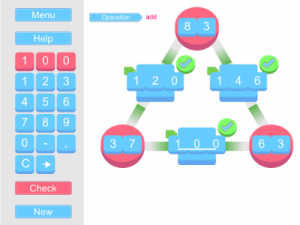
This interactive whiteboard resource is intentionally fast paced to encourage students to estimate and consider what answer looks correct without necessarily working it out accurately. The fast pace also ensures a number of students can have a turn at the front of the class without taking up to much time.  Class questioning could consider what ways we can check whether an answer looks right.  I.e. adding 2 odd numbers will produce an even answer, rounding to the nearest ten and then adding for an estimated answer etc.

Borrowing the idea of diffusing a bomb from television drama the students need to connect the components together based on the addition questions and answers.  Click and drag from the question to the answer (or vice-versa).  Every failed connection results in sparks and a 5 second time penalty so accuracy is important.

This resource has sound so ensure your speakers are at an appropriate level.

As always if you encounter any bugs or problems please report it here.  If you like this resource and would like it applied to another concept or have a suggestion to improve it also leave your comment.

Go to interactive whiteboard resource.

→ 12 CommentsTags: General Maths · Number · Starter/Plenary