Number Square
August 23rd, 2012 · 2 Comments

This interactive whiteboard resource is the same as the one found on my newly released iPad Number Square App. By releasing a version for the IWB the idea is that whole class teaching can take place using the IWB resource, the teacher can then use an iPad to provide further small group or individual support with a resource the children are already familiar with. Or small groups can use an iPad to use the methods modelled by their teacher. It also, of course, allows you to try the app before you buy.
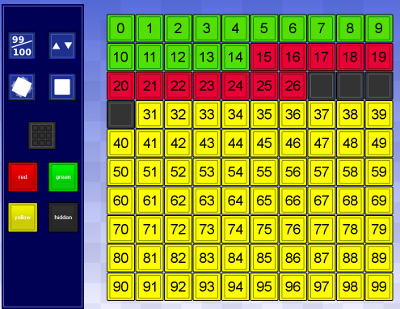
This is a 100 Number square. By clicking the 99/100 button it can be toggled between going from 0-99 or from 1-100. Whatever colour is selected by the buttons with a circle on them will be the colour that the squares will change if tapped. Tapping the button with the four coloured sqaures changes all tiles to that colour. Selecting the lowest left button and then touching individual squares will set them rocking to draw particular attention to numbers or to help any students with colour vision problems identify the squares being looked at. Tapping a sqaure again with this option selected will stop it moving. The button next to it will stop the rocking effect on all tiles that are currently rocking.
This updated version now allows you to highlight multiple squares by swiping across them rather than tapping them individually. This greatly speeds up the set up of new examples.
Go to interactive whiteboard number square. This resource is quite large so for best effect use your browser in full screen (In Internet Explorer press F11).
If you feel this resource plus an interactive clock, a multiplication grid, a number track and a times tables resource would be useful on an iPad please see it in the app store by clicking the icon below:
![]()
Tweet
Tags: Basic Skills · General Maths · General Tool · Number


2 responses so far ↓
1 Guide to Using 100 Number Square // Jan 17, 2013 at 9:20 pm
[...] included in the Numeracy Basics app is that it has an online mirror version. A class can see the same resource on an a interactive whiteboard and receive individual support from the teacher using the same [...]
2 Numeracy App for iPad Review and Giveaway | Colour My Learning // Jan 26, 2013 at 12:32 pm
[...] the 100 Grid on your computer or an Interactive White Board [...]
Leave a Comment