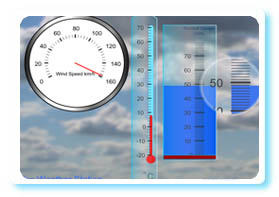
 An update to the most frequently used interactive whiteboard resouce on this site. A variety of measuring devices can be shown on the screen grouped together in themes. Use the arrow buttons to select between them. Click the “New” button to generate a new set of readings.
More than one device is shown on screen to allow for the differentiation between abilities during a class questioning session. Some devices have more complex demarcation than others. Some devices will always move to a whole mark on the scale others allow a measurement to fall in between. Those devices where the demarcation may be difficult to read from a distance use a magnifying mechanism alongside them.
Reading scales 2 interactive white board resource.
The original reading scales resource. On the whole this uses more straightforward scales so may be useful for introducing the concept.
If you have any suggestions for new measuring scales for this resource or encounter any problems please leave a comment.
This is fantastic – good for the top lot (y3 /4) Thanks
You have Very useful tools for teaching scales.
Please how would you tackle this scenario:
assumptions:
10 student( mixed gender, age 16-18) in class
most Entry L3 ( but 2or 3 have Level 1)
one student is deaf in left ear
another student has Attenton Deficit Disorder
explain:
What your lesson plan for 1 hour lesson look like?
What materials woul you use?
I’m glad you like the tools. I’m sorry I can’t really answer your questions as I have little experience with the age range/SEN you describe. Perhaps others may be able to help. They are welcome to respond here.
How do you download & place in notebook software for a lesson? I have tried everything!!!
Sorry the resources are for using on-line only. The downloading of them is against the terms and conditions of the site. This is the only way that the site can be free to use.
Wonderful resource appropriate for SQA Level 3 & 4 Numeracy taught at this FE college. Links to the resource have been placed on our VLE for both student independant and staff classroom use.
I love your stuff. Is there any way that the red and blue buzzer can have two different sounds????
Also wondering if you have anything to do with kernaugh maps….similar to venn diagrams.
Your website is going to be a fantastic asset to my maths lessons. Thanks
Thanks for feeding back. There is no reason why the buzzer (this resource)couldn’t have different sounds. I tend to be quite sparing with sounds though as I find them harder to make than graphics and the programming side of the resources. More sound effects means less time to work on other resources. If I find one suitable though I will add it.
As for kernaugh maps I’d never heard of them until now… maybe something for the future
A fantastic resource but the top part of the dials are coming off my page and I cannot see the top markings (particularly the circular dial). Any ideas why??
I’m not sure why that would happen. The only thing I can think of is that you computer’s resolution is too low. However none of the resources have a resolution above 800X600 so I’d be surprised if your resolution was close to this unless you are using a netbook.
Have you tried pressing F11 to make it full screen?
awesome!
I teach both Geography and Maths and love this resource as it allows me to join 2 subjects I love.
For those of us that might don’t use inches where we are from, would it be possible to have a page with just centimetres???
Just come across this measurements scale reading activity, but can’t quite work out how to use the ‘in the workshop’ one. Are you just reading the ins version of the cm reading?
The tape measure shows the centimetre readings and the calipers show inches. The tape measure has its readout zoomed as the millimetres are a bit hard to read from a distance on the actual measure. The inches are larger so are easier to make out the demarcations.
I know that counties’ use of imperial and metric aren’t as mixed up as here in the UK where we flit from one to the other depending on tradition, mood and the prevailing wind. I felt that the purpose of this resource is more about working with the scales than the actual measurement they show so that is why there is a mix of imperial and metric. It is all about working out the scale demarcation etc. Whether you use inches or not, if reading scales is understood it can be used to understand the inches measurement. Having said that I can see that people are using for teaching measurement too so I’ll look at adapting this resource to help with that – and I’ll make sure both measurement systems are covered.
Great site and really useful too – Thanks – my adult learners will enjoy this
This is a great resource.
I am currently writing an on-line course for Numeracy Level 2. I would like to use youreading scales 2 resource in a “Captivate” video so that students studying on-line could make similar use of it as students in a class with an IWB. I would put this on you tube and give you full credits. Please let me know if this would be ok.
Many thanks