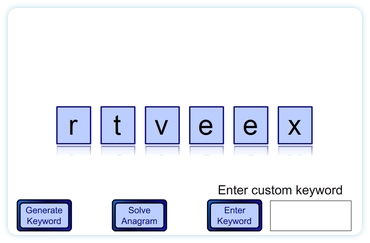
 This interactive whiteboard classroom activity produces a scrambled maths keyword for the students to solve. Alternatively enter a word for the computer to scramble and present. Useful as a starter to the lesson or to fill some time for the early arrivals while waiting for the rest of the students to arrive. Have a word projected on to the interactive whiteboard ready for students to unscramble.
As this resource also allows custom keywords to be entered it can be used for subjects other than maths.
Go to learning resource
This resource has been replaced with Maths Keyword Jumble which will work on all devices.
Hi Spencer, tried to enter some key words but some of them have gone all wonky. Is there any way I can delete them also is there a limit to how many letters I can type? I tried parallelogram but it went all weird. I am doing 2d shapes next week and we have ofsted so I really do want to get this right… any ideas please
Patricia’s comment was resolved by email, but so that others know…
There is an 8 letter limit.
Custom words can only be entered and generated one at a time and cannot be persistently saved. This is possibility when the new Flash Player is released later in the year.
A custom version of the resource which uses only 2D shape keywords has been published for Patricia. If anybody else would like a custom list (especially for other subjects) please do get in touch.
I cannot believe how quickly you responded and sorted out my problem. You are seriously awesome and so are your resources. What a fantastic service. I really do appreciate everything that you have done. A HUGE thank you. Patricia
Another cooooooooool idea! Love to use this to reinforce key words from lessons prior to subsequent resumption of a lesson a day or two later! Thanks.
Still loving all these resources
Any chance that you could extend the 8 letter limit?
Thanks.
I’ll see if I can do that. It might make each letter a little smaller though.
EDIT:
It now has a ten letter limit. It also resulted in me spotting an error so if you’ve ever had a problem with letters getting stuck on the left it should happen no more!
Thanks for taking the time to write the suggestion. I hope it is more useful to you now (and that I haven’t inadvertently introduced any new problems).
Thanks!!!!!
my teacher uses it is so fun
Hi
I am an Arabic teacher at Primary level and am looking for Arabic resources for our newly installed IWBs. Do you have resources? Or do you know where I could get hold of some.
Many thanks
Zaheer
Sorry I don’t know of any Arabic resources and there are none on this site as I don’t know Arabic. Some years back I did learn the numbers (just to 10!) and it has crossed my mind to make some bilingual resources with numbers in both European Arabic numerals and another Eastern Arabic numeral system. This idea was more linked to a history of maths perspective though so probably isn’t really what you hope for.
It would, of course, be possible to use other numbers in the resources it is just that there isn’t enough time to do everything I would like. In an ideal world all of the resources would be multilingual and multi numeral system. Sorry that doesn’t help you though. Hopefully, somewhere, there is an individual or company working to plug this gap in education resources.
If anyone does know of suitable resources do feel free to link here.
Spencer
I absolutely love this idea. This is great – especially because the kids can use it to test each other!! Love it. Thank you!
Hi, I have typed words in but nothing happens afterwards What am I doing wrong? I have read the instructions several times but can’t seem to work this one out…help!
Ive worked it out..more than 4 letters does the trick.
Thanks for answering your own question, I would have been racking my brains trying to think why it wouldn’t work.
Hi, this is great. However, is there any way to make the sort a lot faster, I can image a bottom set Yr8s becoming bored with the answer reveal.
Thank you.
It has been a long time since I wrote this resource and I’ve not needed to use it for a while. I didn’t remember it was so slow. You’re right it could do with speeding up. I wrote this when I was less organised in my programming code. Hopefully I can fix this without it becoming too big a job. Thanks for the suggestion.