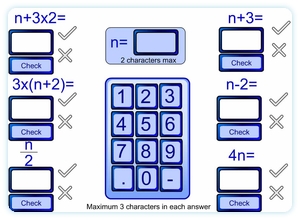
 This learning resource allows the teacher to demonstrate algebraic substitution. Different values for n can be chosen. Students can then be asked to come to the interactive whiteboard to input an answer. The answer can be immediately checked by the resource.
Go to learning resource
Buttons
Keypad: To allow entry from the interactive whiteboard the keypad can be used to enter answers. The computer keyboard can also be used.
n=: Click the empty rectangle next to n= to select the textbox to enter the value of n to be used. Clicking this also clears all answers entered so far.
Empty Rectangles: Below each expression is an empty rectangle. Click this to select which answer to attempt. Clicking it will clear whatever is already in the box.
Check: After entering an answer the student can click this button to see if the answer was correct. The cross or tick will illuminate to give the result.
this was amazing at helping my class revise
I have just discoved your fantastic web-site!!!!
I like this presentation very much and wondered if there were more examples of this resource with different formulae? Such a great idea which would be good to use with different abilities and stages.
This is one of the oldest resources on here and is one I’d like to update with more options on formulae or at least a few versions of differing difficulty. I’d also like to modernise the look a little.
Spare time is always the problem though. Hopefully I will get to it in the not too distant future. Nice to hear one of the old resources is still used so thanks for commenting.